
Does anyone still practice typing the way schools once taught? Older readers might remember a time when keyboarding classes were a staple of education, and students would race to improve their words-per-minute scores while maintaining accuracy. That era has faded, replaced by voice input and gesture-based typing on mobile devices. Yet, there remains something deeply satisfying about tapping on a virtual keyboard at high speed, watching letters appear as quickly as your fingers can move. For those who enjoy that experience, Gboard is preparing a delightful new feature that celebrates truly fast typing.
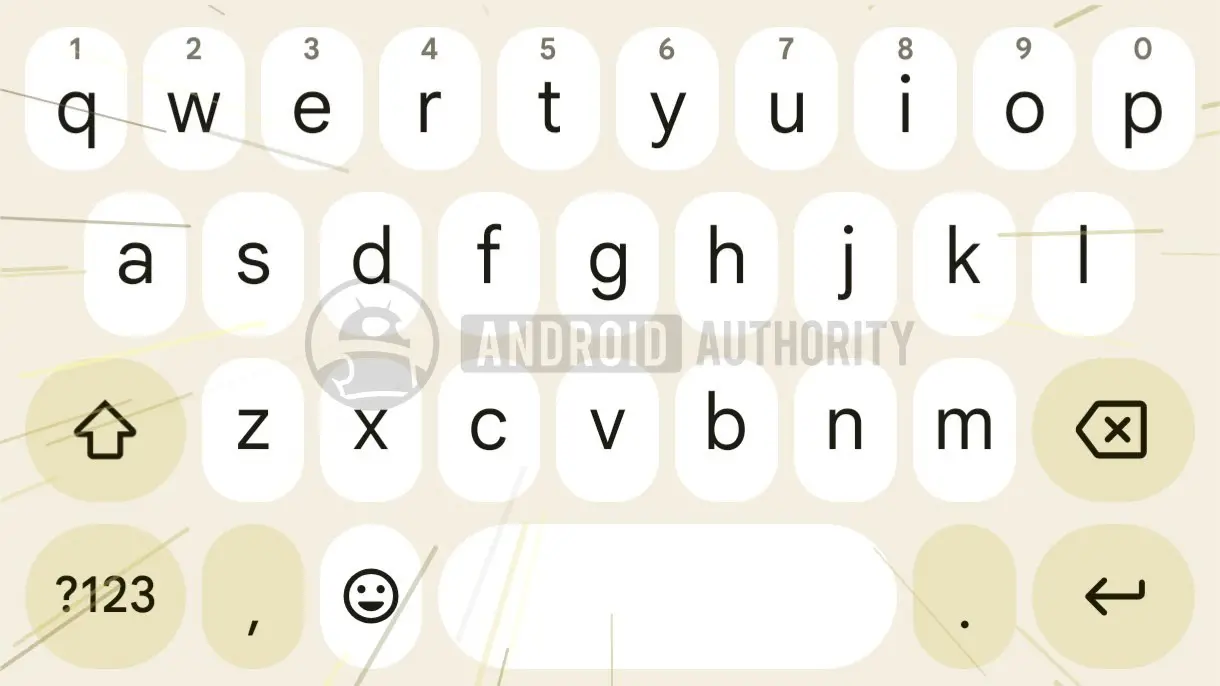
An APK teardown of Gboard version 18.0.3.954559732-beta-arm64-v8a reveals that Google has begun developing an animation designed to activate when users type at exceptionally high speed. The effect consists of moving horizontal lines that resemble the classic "warp speed" streaks seen in science fiction movies. Instead of a static keyboard, the visual suggests that your input has pushed Gboard into an overdrive mode, with the keys themselves seeming to blur past. The animation appears intended to convey the feeling of being "in the zone," a state where external distractions disappear and the keyboard feels like an extension of your own hands.
This is not the first time Google has experimented with whimsical touches inside Gboard. Over the years, the keyboard has added features like emoji search, GIF support, and a variety of themes. But this new animation stands out because it reacts to user behavior in real time. Rather than being a simple static or decorative element, it responds to how intensely a user is typing. The concept is simple: type fast enough, and your keyboard visually celebrates the accomplishment.
A Closer Look at the Animation
The animation itself is subtle but striking. According to the teardown, the effect involves a series of parallel lines that sweep across the keyboard area, usually oriented horizontally. These lines are reminiscent of the motion blur seen in fast-moving scenes or the light trails in long-exposure photography. The visual metaphor is clear: your fingers are moving so quickly that even the keyboard cannot keep up visually. It is a playful and immersive way to give users positive feedback for their typing speed.
While the animation has been spotted in the beta code, many details remain unknown. Google has not officially announced the feature, and it is unclear whether the animation will be enabled by default or require a manual toggle. Some users may find the effect distracting during extended typing sessions, so an option to disable it would likely be appreciated. However, Google has not yet revealed any settings associated with the animation.
Another open question is the exact activation threshold. How fast does a user need to type for the animation to kick in? Is it measured in words per minute, or does Gboard track something like the time between successive key presses? Without official documentation, these specifics are purely speculative. The code might reveal a numeric threshold, but that value has not been confirmed. It is also possible that Google will adjust the threshold during beta testing based on user feedback.
The feature was discovered through a process commonly known as an APK teardown, where developers or journalists inspect the code of a pre-release app to find hints of upcoming functionality. This method can predict features that may arrive in a future version, but it is not a guarantee. Google might abandon the animation before it reaches a stable release, or it could significantly change the design. In the past, many features found in teardowns have shipped, but equally many have been shelved.
The Evolution of Gboard's Typing Experience
Gboard has evolved considerably since its launch. What started as a simple keyboard app has become a comprehensive typing platform that integrates Google Search, Translate, and even Stickers. The app consistently introduces features designed to make typing quicker and easier. Glide typing, for instance, allows users to trace a path over the letters instead of tapping each key individually. Voice typing has also improved dramatically, offering near-instant dictation with impressive accuracy.
Despite the convenience of these alternative input methods, many users still prefer tapping. There is a tactile satisfaction in pressing each virtual key, and for those who have mastered touch typing on a phone, it can be remarkably fast. The new animation seems aimed at this segment of users. It rewards not just speed, but the kind of fluid, uninterrupted typing that comes from practice and muscle memory.
The idea of giving visual feedback for speed is not entirely new. Some third-party keyboards and typing games have included speed-based effects, but Gboard would be integrating it into a mainstream keyboard with hundreds of millions of users. This could make the feature far more prominent and could inspire other keyboard developers to create similar experiences.
Typing Speed in the Modern Age
It is worth remembering that typing speed has been a metric of fascination for a long time. The world record for typing on a virtual keyboard is held by a user who managed to maintain a pace that most people would find impossible. Yet, the average smartphone user types at a much slower rate, often around 20 to 30 words per minute. The threshold for Gboard's animation may be set high enough that only the most dedicated typists trigger it, or it might be accessible to anyone who picks up the pace for a short burst.
There is also a nostalgic angle. Older readers might recall the days of dedicated typing tutors and the satisfying sound of mechanical keyboards at high speed. The new animation taps into that same sense of achievement, but in a modern and futuristic way. The warp-speed lines are a nod to pop culture's obsession with faster-than-light travel, and they turn even a mundane typing session into a mini science fiction moment.
For now, users of the beta version of Gboard may not see the animation right away, as such features are often hidden behind code flags and are not always enabled for every tester. Google typically deploys features gradually, using server-side configuration to control who sees what. This allows the company to test the impact of a new feature on user experience without committing to a full release.
What the Future Holds
Assuming the animation does make it to the stable version of Gboard, it would join a growing list of playful interactions that make the keyboard feel alive. Gboard already has haptic feedback, animated emoji, and a theme engine. The speed animation would be one of the first features to directly respond to typing velocity. It could even be used in conjunction with other features, such as showing confetti after a fast and accurate typing session. However, all of that is pure speculation at this point.
Another possibility is that Google could tie the animation to achievements or statistics. There are already keyboard apps that track your typing speed and show trends over time. Gboard does not currently offer such analytics, but the introduction of a speed-sensitive animation might be a step in that direction. Users who see the animation frequently could infer that they are typing above a certain speed threshold, which might encourage them to push even faster.
The anonymous developer who spotted the animation shared only a short video clip and a few details. The clip shows the effect in action, with the lines sweeping across the keyboard in a smooth loop. It looks polished despite being in early development, which suggests that Google has spent time refining the visual style. The animation is not intrusive; it does not obscure the keys or interfere with typing. It appears to run behind the letters, adding a subtle layer of motion.
Some users have expressed concern that the animation might be distracting or that it could drain battery life. An animation that runs continuously at high speed would require extra processing power, but the effect seems to be brief and triggered only during bursts of fast typing. It is unlikely to have a noticeable impact on battery life, especially on modern smartphones that are optimized for efficient graphics rendering.
Privacy is another angle to consider. The animation is triggered by local typing behavior, and Gboard does not send your actual keystrokes to Google for analysis unless you use cloud-based features like voice dictation or translation. The animation is simply a visual response to how fast your finger taps the screen, and it can be implemented entirely on-device. Users who are concerned about their typing data being recorded should rest assured that this feature does not seem to require any additional data collection beyond what Gboard already does.
For those who cannot wait to try the animation, there is an option to install the beta version of Gboard from the Google Play Store. However, as mentioned earlier, the feature may not be visible or active in the current beta build. Users who are comfortable experimenting with unstable software can enable beta updates, but they should be prepared for bugs and inconsistencies. If the animation is not present in the initial beta release, it may appear in a subsequent update once Google decides to activate it.
The broader context of this discovery is the importance of small details in app design. The best apps are those that pay attention to the little things, the subtle animations and micro-interactions that make an interface feel responsive and alive. Gboard has always been known for its polished design, and this new animation is another indication that Google is willing to go the extra mile to make typing a joyful experience.
It also signals that Google is still investing in Gboard as a core product, despite the rise of voice assistants and other input methods. Typing remains a fundamental way of interacting with smartphones, and improving the keyboard has a direct impact on user satisfaction. The animation might seem trivial, but it adds a layer of personality to an app that users interact with hundreds of times a day.
As the beta program continues, more details are likely to emerge. Users might discover hidden settings that let you customize the animation threshold or animation style. Perhaps there will be multiple animation variants to choose from, such as a subtle shimmer or a full-screen light show. Google has a history of experimenting with playful features in Gboard, and some of them have become beloved additions. The speed animation has the potential to be one of those features if it ships.
For now, the typing animation remains a tantalizing glimpse of what is to come. Whether it will make landing in the stable version is uncertain, but the very existence of the code suggests that Google is actively working on it. The next time you find yourself typing at a breakneck pace on Gboard, you might just see a flash of moving lines. If that happens, you'll know that your keyboard is celebrating your speed in style.
Source:Android Authority News