

We find the most joy using our smartphones as social media machines, but our phones also handle mundane activities like communication and navigation. If you're on Android, you most likely default to Google Maps to plan your commutes and explore new places. While Apple Maps' many useful features make it a compelling alternative, Google Maps enjoys a huge user base, likely because it has had a head start of more than a decade in mapping out even the most rural corners of the world. Among its vast array of features, one subtle icon often goes unnoticed: the green leaf symbol.
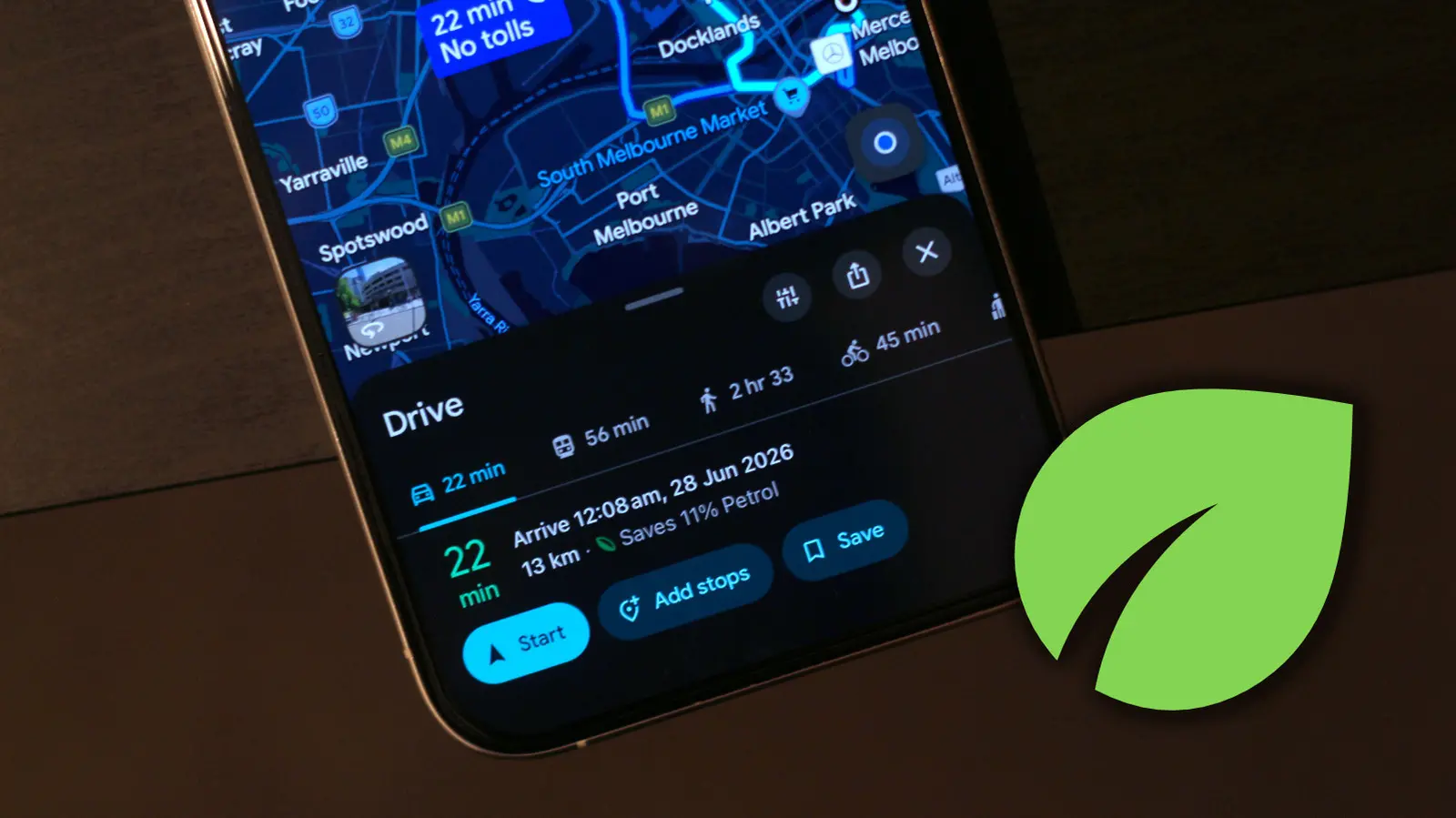
For those of us who aren't passionate navigators, Google Maps offers a clean user interface with easy-to-understand controls. That said, there are several quality-of-life Google Maps features that are easy to miss. These are often hidden within menus or denoted by icons you might not have given much thought about. The green leaf symbol is one such example that shows up when you start picking a route to a destination. It essentially indicates that the route is the most eco-friendly option.
How Google Maps Calculates Eco-Friendly Routes
Google Maps determines which route is the most eco-friendly by taking into consideration factors such as real-time traffic, road conditions, and the type of vehicle you drive. The algorithm analyzes data from various sources, including historical traffic patterns, current congestion, and even the terrain of the route. For instance, routes that involve frequent stops, steep inclines, or heavy traffic are less fuel-efficient. By avoiding these, the eco-friendly route can save fuel and reduce emissions. The system also considers the engine type you specify, as different vehicles have different fuel consumption profiles.
When you select a route, Google Maps displays a small leaf icon next to the estimated travel time and distance. You can view more info about the eco-friendly route if you expand the navigation details from below. Google Maps will display how much gas you'll be saving by picking this route and, if applicable, how much longer your trip will take compared to the fastest route. This transparency helps users make informed decisions, balancing time and environmental concerns. The eco-friendly route is not always the fastest, but the savings in fuel can be significant over many trips.
Customizing Google Maps for Eco-Friendly Navigation
Relying on eco-friendly routes is an effective way to save fuel in your car. You can customize your Google Maps experience to let it automatically select eco-friendly routes whenever available. To do this, open Google Maps, tap on your profile picture, head to Settings > Navigation, and turn the "Prefer fuel-efficient routes" toggle on. From now on, assuming your destination has more than one route, Google Maps will automatically put you on the one that saves the most gas. This setting is particularly useful for daily commutes where you may not want to manually choose routes each time.
Now is also a good time to enter more details about the vehicle you're driving, since, by default, Google Maps calculates routes assuming you have a gas or petrol-powered car. Navigate to Settings > Your Vehicles and select an engine type. Options include petrol, diesel, hybrid, and electric. This is important because Google Maps estimates eco-friendly routes based on your vehicle's engine type. For example, a hybrid vehicle benefits from different routing logic that prioritizes regenerative braking opportunities, while an electric vehicle might be routed to include charging stations if needed. You can also select a different avatar for your car and motorcycle. This replaces the default blue navigation arrow that shows where you are on the map, adding a touch of personalization.
Vehicle Types and Their Impact on Route Selection
Choosing the correct engine type in Google Maps settings significantly affects the accuracy of eco-friendly route recommendations. For petrol and diesel vehicles, the algorithm aims to minimize fuel consumption by avoiding aggressive acceleration and deceleration, as well as heavy traffic. Hybrid vehicles benefit from routes that allow more frequent stops where regenerative braking can recharge the battery. Electric vehicles (EVs) have a different set of considerations: Google Maps can suggest routes that include charging stations and optimize for energy efficiency based on battery level. This is particularly helpful for long trips where range anxiety can be a concern. The system also accounts for factors like temperature and elevation, which affect EV range.
By accurately setting your vehicle type, you ensure that the eco-friendly route is tailored to your specific car. For instance, a diesel engine may have different optimal speeds compared to a petrol engine. The integration of real-time data, such as weather conditions and road construction, further refines the recommendations. This level of customization makes Google Maps a powerful tool for reducing your carbon footprint without sacrificing convenience.
Environmental Benefits of Eco-Routing
The environmental impact of choosing eco-friendly routes is substantial. According to Google, their routing algorithms can reduce fuel consumption by up to 10% per trip. When multiplied across millions of users daily, this translates into significant reductions in greenhouse gas emissions. For example, a study by the International Council on Clean Transportation found that optimizing driving routes can reduce CO2 emissions by 5-15% depending on the region and driving conditions. By using Google Maps' eco-friendly routing, drivers contribute to cleaner air and less dependence on fossil fuels.
Beyond personal savings, the collective benefits include reduced traffic congestion as more efficient routes distribute traffic more evenly. Additionally, the feature encourages drivers to be more mindful of their driving habits. Many users report that seeing the leaf icon prompts them to drive more smoothly, which further improves fuel economy. This behavioral change, while small, adds up over time. The eco-friendly route feature is part of Google's larger commitment to sustainability, which includes carbon offsetting for its data centers and investments in renewable energy.
Additional Google Maps Tips for Efficiency
In addition to eco-friendly routing, Google Maps offers several other features to help you save time and fuel. For instance, the "Depart at" or "Arrive by" feature lets you plan trips to avoid peak traffic hours. By leaving at a less congested time, you can reduce idling and stop-and-go driving. The app also integrates with real-time mass transit information, allowing you to consider public transportation options, which are often more environmentally friendly than driving alone. Furthermore, Google Maps can alert you about road closures, accidents, and other hazards, helping you avoid delays that waste fuel.
Another useful feature is the ability to save parking locations. When you arrive at a destination, you can mark where you parked, making it easier to find your car later. This reduces the time spent driving around looking for a parking spot, which can waste fuel and increase emissions. For frequent travelers, Google Maps also provides personalized recommendations for nearby points of interest, such as restaurants or gas stations, based on your history and preferences. These can be tailored to include fuel-efficient options, like EV charging stations or eco-friendly businesses.
Moreover, Google Maps has a feature called "Location sharing" which can help coordinate pickups and drop-offs, reducing unnecessary driving. For users who bike or walk, the app offers dedicated routing that prioritizes bike lanes and pedestrian paths, promoting active transportation. Each of these features contributes to a more sustainable lifestyle by making it easier to choose greener options.
The leaf symbol on Google Maps is more than just an icon; it represents a practical tool for reducing your environmental impact. By understanding what it means and how to customize the setting, you can make your daily commutes and road trips more fuel-efficient. Whether you drive a traditional gas car, a hybrid, or an electric vehicle, Google Maps provides the tools to help you save money and protect the planet. With ongoing updates and improvements, the eco-friendly routing feature will continue to evolve, offering even greater benefits in the future. So the next time you see that green leaf, remember: it's not just a symbol, but a step toward a more sustainable way of traveling.
Source:SlashGear News